Popups
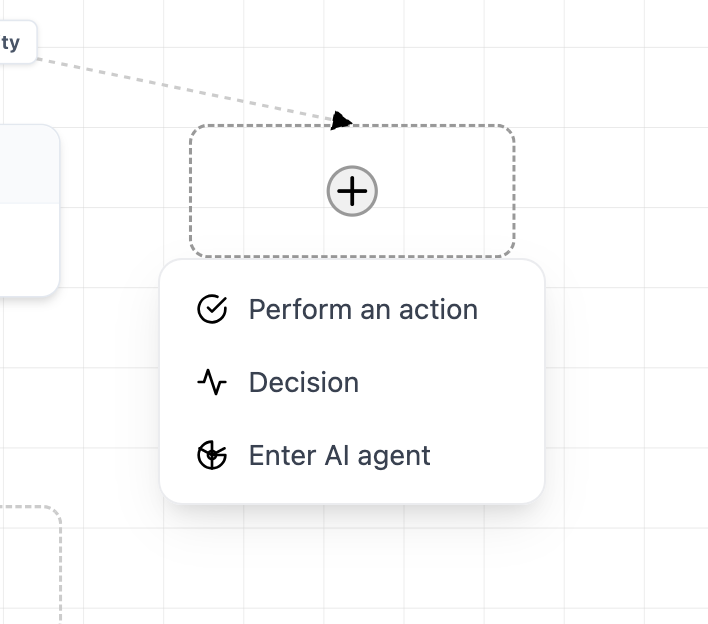
Popups, new in 1.2.1, offer a means for you to declaratively attach some component to act as a popup on a vertex, and as the user pans, zooms or drags the vertex, VisuallyJs will ensure that the popup remains in place relative to the element.
Configuration
Declare Component
To configure a popup in Svelte you need to define a component that will take avertex, model and ui as props (and, optionally, a hide function that your component can use to tell the popup to hide). This example (shown above) is from our AI Agent Builder demonstration:
<script>
import {BrowserUI, Node, VisuallyJsModel} from "@visuallyjs/browser-ui";

const {vertex, model, ui, hide} = $props()
</script>
<div>
{#if vertex != null}
  {vertex.data.label}
  {model.getNodes().length}
{/if}
</div>
Your component has access to:
- the vertex the popup is attached to
- the data model
- the UI that rendered this popup
- a function you can invoke to instruct the popup to hide
Configure Popup
Then to declare that you want to use this component as a popup, you need to declare aSurfacePopup in your component's template, and specify the selector that the popup should listen for:
<SurfacePopup selector=".vjs-next-step-picker">
  {#snippet popup(vertex, model, ui, hide)}
      <PopupComponent {vertex} {model} {ui} {hide}/>
  {/snippet}
</SurfacePopup>
Add Popup Launcher
Lastly, you can now include a launcher for this popup anywhere inside a component you're using to render a vertex:
<script>
import { defineProps } from "vue";

const {data, vertex, ui} = defineProps()
</script>
<div>
<h1>{{data.label}}</h1>
<button class="vjs-next-step-picker">Launch popup</button>
</div>