Graph propagation engine
The GraphPropagationEngine is a class that you can use to automatically propagate values through a dataset, using a simple API in which you only need to define three things:
- the type of the value that will be propagated along edges
- the type of each node's computed internal state (actually optional)
- a calculator for each node type, which is responsible for returning each node's internal state and outputs
Use cases for this functionality are many and varied. Here's a simple maths equation UI where users can increment and decrement values and see changes downstream:
Setup
There are a few concepts you need to familiarise yourself with to use the graph propagation engine, but this seems like something where starting with an example will be better. Once you've read through the code in this section, the information in the concepts section below will probably make a bit more sense.
For the maths app shown above, we have four node types:
- variable These are the inputs to an arithmetic node
- plus A node that performs the addition operation on its inputs
- multiply A node that performs the multiplication operation on its inputs
- result A node that displays a result
Value type
The type of value propagated along edges is number.
Internal state
All nodes in VisuallyJs have a data object backing them, which is internal state. Internal state in this page, though, refers to computed internal state, which can change each time the engine runs. It is stored inside the data object, keyed by the property name computed.
Our variable and result nodes don't need computed internal state. But we want our arithmetic nodes - plus and multiply - to compute a human readable representation of the equation they ran.
Calculators
Each node type from which we wish to extract values must have an associated Calculator defined. In the case of this maths app, we need one for variable, plus and multiply. We do not need a calculator for result as we only write to that node type. So, this is the source code for the calculators used above:
const mathsCalculators = {
  "plus":(node, context) => {
    const inputs = context.inputs()
    return {
      state:{
        // plus node's internal state is
        // a human readable equation
        equation:inputs.join(" + ")
      },
      outputs:{
        // plus node default output is the sum of its inputs
        default:inputs.length > 0 ? inputs.reduce((a, b) => a + b) : 0
      }
    }
  },
  "multiply":(node, context) => {
    const inputs = context.inputs()
    return {
      state:{
          // multiply node's internal state is
          // a human readable equation
        equation:inputs.join(" * ")
      },
      outputs:{
        // multiply node's default output is the product of
        // its inputs
        default:inputs.reduce((a, b) => a * b, 1)
      }
    }
  },
  "variable":(node, context) => {
    return {
      outputs:{
        // variable node outputs the `value`
        // from its backing data
        default:node.data.value
      }
    }
  }
}
UI Setup
In an app, configure the graph propagation engine via the plugin:<script>
import { SurfaceComponent } from "@visuallyjs/browser-ui-svelte"
import { PLUGIN_TYPE_GRAPH_PROPAGATION } from "@visuallyjs/browser-ui"
const renderOptions = {
plugins: [
{
type: PLUGIN_TYPE_GRAPH_PROPAGATION,
options: {
calculators: mathsCalculators
}
}
]
}
const viewOptions = {
nodes: {
plus: {
component: PlusNode
},
multiply: {
component: MultiplyNode
},
variable: {
component: VariableNode
},
result: {
component: ResultNode
}
}
}
</script>
<SurfaceComponent {renderOptions} {viewOptions}/>
Example - Logic Gates
Another example of the usefulness of this engine is that of logic gates:
Try tapping the nodes on the left hand side - the boolean value in the given node will be toggled, and the new value will be propagated through the diagram.
We have four node types in this example:
- AND gate Performs a logical AND operation
- OR gate Performs a logical OR operation
- source A value source
- sink Displays an output value
Value Type
For this app, we're going to use this type (from the Logic Gates starter app):
export type BooleanValue = 1 | 0
Internal State
We don't need to compute any internal state for this app.
Calculators
We'll be pulling values from nodes of type and, or and source, so we need a calculator defined for each of those types:
const booleanCalculators = {
  "and":(node, context) => {
    const inputs = context.inputs()
    // compute the logical AND of all the inputs
    const out = inputs.length > 0 ? inputs.reduce((a, b) => a && b) : 0
    return {
      outputs:{
        // return the logical AND as the default output
        default:out
      }
    }
  },
  "or":(node, context) => {
    const inputs = context.inputs()
    // compute the logical OR of all the inputs
    const out = inputs.reduce((a, b) => a || b, 0)
    return {
      outputs:{
        // return the logical OR as the default output
        default:out
      }
    }
  },
  "source":(node, context) => {
    return {
      outputs:{
        // the source node returns 'value'
        // from its backing data
        default:node.data.value
      }
    }
  }
}
Concepts
The above examples reference several interfaces - this section presents the interface definitions and offers some explanatory text on each one.
ValueType
This defines the type of value that flows along edges. In our maths example on this page we used number for the value type, and in the logic gates example we used BooleanType. You can use any type.
Calculator
A Calculator is a function that takes a Node and an EvaluationContext and returns a NodeEvaluation or undefined.. The definition of this type is:
| ValueType | Defines the type of the node's output values. | |
| StateType | Defines the type of the node's internal state. |
input(...)inputs(..)(node:Node, context:EvaluationContext<ValueType>) => NodeEvaluation<ValueType,StateType> | undefinedEvaluationContext
This is the context object passed to each calculator so it can ask for the current value on an input terminal without needing to know how the graph is connected.
| Name | Type | Description |
|---|---|---|
| input | (terminalId:string) => ValueType | Reads the value connected to one input terminal. Omit |
| inputs | (terminalIds:Array<string>) => Array<ValueType> | Reads named input terminals in order. When omitted, reads every edge connected directly to the node body, in edge order. |
NodeEvaluation
This is the return value from a Calculator:
| ValueType | Defines the type of the node's output values. | |
| StateType | Defines the type of the node's internal state. |
outputs:Record<string,ValueType | undefined>,
state:StateType
}
Advanced usage - ports
The two examples given on this page have both worked with datasets where values are propagated at a node level. In many real world scenarios, though, you'll be working with a dataset involving ports. This is the case with our Logic Gates starter app:
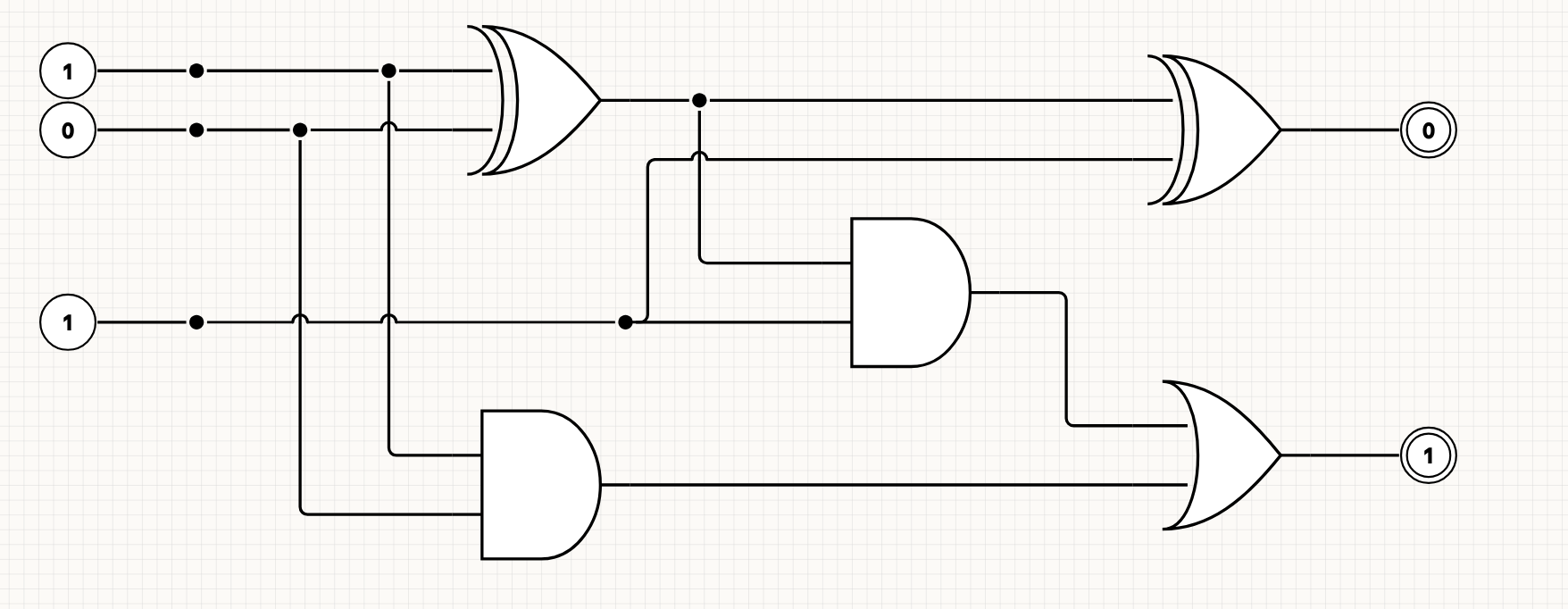
Each logic gate contains two named input ports ("in1" and "in2"), and one named output port ("out"). The source and sink nodes use values at the node level.
The only difference when working with ports is inside your calculator functions - where in our previous examples we used the inputs() method of the evaluation context to retrive all inputs to some node, when working with ports it is more usual to use the input(terminalId:string) method. You can find the code for the logic gates starter app here on Github, but here's an example of how the AND gate calculator is written:
{
    "and-gate":(node:Node, context:EvaluationContext<BooleanValue>) => {
        const in1 = context.input("in1")
        const in2 = context.input("in2")
        return {
            outputs:{
                out:in1 && in2
            }
        }
    }
}
You can see how the code retrieves named inputs "in1" and "in2", and exports a named "out" output. Compare this with the code for the junction type (which uses node level state, and passes it through to its output):
"junction": (_node:Node, context:EvaluationContext<BooleanValue>):NodeEvaluation<BooleanValue, BooleanState> => {
  const value = context.input(DEFAULT_TERMINAL)
  return {
    outputs: {
      [DEFAULT_TERMINAL]: value
    },
    state: {
      value
    }
  }
}
..and the source node type, which just extracts a value from its data:
"source": (node: Node) => {
  const value = node.data.value as BooleanValue
  return {
    outputs: {
      [DEFAULT_TERMINAL]: value
    },
    state: {
      value
    }
  }
}